Showing posts with label technical. Show all posts

Friday, 17 April 2015

Boss ME-80 Multiple Effect Unit

Something to truly fall in love with.....


Be a beginner or a professional player this is something that you'd love to have in your kit as a guitarist. I see this as a successful fusion between highly sophisticated menu orientated GT-100 and very tactile and organic good old stomp box. This is a big jump in the right direction from it's predecessor ME 70. Roland has really done its home work to produce this piece of beauty !

Ergonomics

Well, all I can say is this has the right size and right weight for it to be portable yet comfortable on stage.(Check the specs) The feel good heaviness of the unit is a comfort when it comes to the real deal on stage. Right weight and the rubber studs on the bottom with make sure it would not move under your feet. Angulated surface makes it comfortable for the feet and makes controllers and the switches more accessible. Huge improvement from the Me 70 is bringing lots functionality from small manual buttons to foot control switches so the player doesn't have to stop playing and bend down to adjust settings.
Only downside is the not so robust effect peddle compared to the one on ME-70. But this is something you could easily get use to. 

Power supply
Designed to be used with 6 AA batteries. Boss boasts a battery life of 7 hrs with alkaline batteries. Also you have the option of using Boss PSA series AC adaptor. (Worth mentioning that a cheaper 3rd party adaptor would be a safer option as well according to some reviews.)

Connectivity


This is where ME-80 becomes a champion. For the first time ME series is connectable to a computer via a USB. This allows the unit to be connected to its native software Boss Tone Central(which comes free) where you can add, save and edit your patches and settings very conveniently. Boss provides quite a collection of free live sets full of different useful patches which are downloadable. Have a look here. Midi transfer of USB is also supported. Also you get usual stereo and mono connections. Headphone connection which is useful if you don't want to disturb your wife. Separate auxiliary connection is useful to connect iPod or any other similar device which will allow you to jam along with audio or midi files.


Whats on the top

Switches and knobs on the top are grouped into simple lay out according to the functions. Knobs are grouped as Pre amps, EQ/FX2, Reverb, Comp/FX1, OD/DS, Mod and Delay.

Then comes all important foot switches designed as 4 different stomps. These also let you select different functions and navigate ..through the menus as well. Effect pedal lies on the side as the king.

Sounds and functionality

There are two main modes. Manual and memory. In manual mode you can operate 4 separate foot switches exactly like separate stomps which will suit old school players use to play with stomps
Memory mode lets you have access into 72 patches. 36 programmable user patches and 36 non programmable preset patches. The sound quality is amazing. Having said that at the high ends you could loose genuine analog sounds to digital abrasions.
Most impressive are the pre amp sounds which very closely mimics the real sounds of old tweed, combo etc.
Did I mention about the loop function. This is amazing for practising and jamming on your own. You just have to try and see.


Overall ?

Very impressive. Very portable robust unit with amazing sound quality and functionality. USB connection opens up further dimensions in controlling the unit. As mentioned before only downsides are the plastic feeling effect pedal and the loss of quality in sounds at high ends. But for the money you pay this is a really good buy. I love it.


Saturday, 8 December 2012

Sri Lankan Wall Papers for free

Here is a wall paper I did for fun. You are welcome to download it for free


For Mac Desktop Click Here

For Windows Desktop Click Here


You'll have to wait 30 seconds there though

I welcome any comments or suggestions 

Sunday, 6 June 2010

How to Jailbreak your 3.1.3 iphone 3GS....AT LAST


I bought my new 3GS iphone at the end of my contract with O2 in last February. Having used a jailbroken 3G iphone before I certainly wanted to jailbreak this new toy for greater pleasure.

Now I was aware of the fact that new baseband 3.1.3 with new boot rom could not be jail broken at that time. However since my 3GS iphone came out of the packege as 3.1.2 I didn't have any doubt when I connected it to the itune to jailbreak.

Alas ! before I knew my iphone was restored with brand new version of 3.1.3 which obviously cut me off of the joy of having a jailbroken phone.

Jailbreaking cat and mouse game was already started at that time and the king of Jail breakingGeoHot, Daveteam, MuscleNerd and many more were on the front line of the war.

As expected it didn't take a long for GeoHot to come triumphant  yet again and he claimed the victory with this video.But unfortunately for people like us who accidently upgraded the iphone this was not of any use, since he was not bothered to publish it.His big ego (as he admits in his video given above) wouldn't let him help us  this time.

Then came a saviour,......Spirit with the coolest and easiest JB ever(which is untethered) and made any version of iphone, ipod and ipad jailbreakable !.

I used his software and within minutes the job was done, freeing my iphone from the iron claws of Steve_Jobs.Below is how it is done;


Step 1 Download Spirit from here.for your Windows or Mac
Step 2 Backup backup always backup your device in case something goes wrong. Don't  blame others!
Step 3 Unzip the package and run the software.
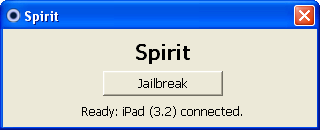
ipad jailbreak
Step 4 Click “Jailbreak”.
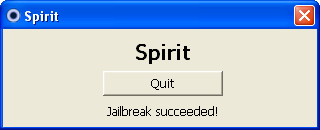
Step 5 Then you will see this
spirit jailbreak succeeded
Step 6  Do not click Quit. Iphone will reboot and come to life with Cydia on it. Job done!.

Errors & Troubleshooting

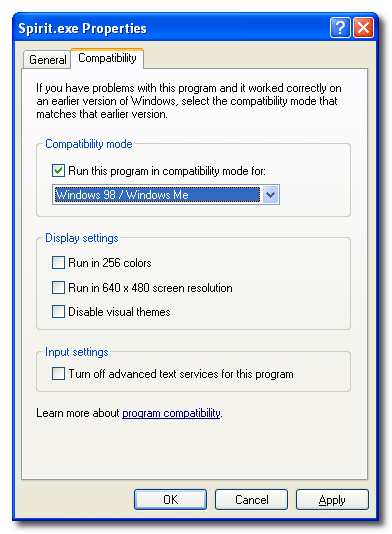
Windows Vista or Windows 7 users may get the error c0000005.
To avoid this error, you have to run Spirit.exe in compatibility mode. To do so:

1.Right click on Spirit.exe and select Properties
2.Select the compatibility tab
3.Check the “Run this program in compatibility mode for” box and select Windows 98 / Windows ME
spirit error compatibility mode

Previously there was a problem with not showing iphone photos. But now I think it is fixed with the latest versions.

Tips
1. Make sure you are 100% certain with Jail breaking.Know the pros and cons of it. I was sure and I did it.
2.Always back up
3.Strongly recommend to read the comments on Spirit web site to get an idea of what other people experienced.
4 Here is a video showing the jailbreak in action
5 Use Cydia carefully. Make sure you get only what you really need. Otherwise you will run out of space/memory/battery life before you know.

Good luck !

Comments welcome. Thanks

Monday, 26 April 2010

BT Softphone on IMac

Anybody having problems with trying to work BT softphone on imac. This is how you do it !

First thing is you should by now know that bt softphone software is not compatible with OS. so you will have to download a 3rd party VoIP soft ware. There are several available

X lite is free and can be downloaded at http://www.counterpath.com/x-lite.html. I use this one
Isoftphone is another and available at http://www.call4mac.com/

Download and install it.

Then you have to configure your account as shown below


Protocol - SIP
*User ID - Last 10 digits of your phone number with 44 prefix (44**********)
*Authorization name- Last 10 digits of your phone number with 44 prefix
*Display name - What ever you want

It is important to type 44 infront of the 10 digits otherwise IT WONT WORK.


Put in your BBTalk phone number & your plain text password

click 'Next'

On the page that appears, click "Configure hub/router"

A little pop-up should appear with a button labelled "Configure"

Right-click on that button and select "Copy link location"

Open a text editor and paste (cmd-v). A long line of text appears.

Look for the string "SIPPassword1="

Copy the next 15 characters (those between the '=' and '&' characters).

Paste that into the X-Lite SIP account password field.


(curtsey of Malcolm_Herring at http://community.bt.com/t5/BB-Out-About/Softphone-settings-for-Mac-users/m-p/4884)


On Tophology tab;


Tick the "Use local IP address " box (Important)


Try this. If it doesnt work you may have to configure your BT HomeHUb to opent ports 5060 and 8000-8005 (for xlite) as well. Here is how you do it


http://portforward.com/english/routers/port_forwarding/BT/BTHomeHub/X-Lite.htm


Good luck. Ask me if there are any questions.


MAIN THING IS IT WORKS ! BT PEOPLE WILL SAY NO. BUT IT WORKS. I USE IT EVERYDAY !


Saturday, 12 December 2009

Can't install nvidia drivers in windows 7?

Hi all.

I upgraded my Sony Vaio laptop VGN FZ21S recently to windows 7. Everything went smooth but when I checked the device manager I noted that for the graphic card driver, I had only something called "Standard generic display driver" (Or something similar to that). This was ok for your basic stuff. But wouldn't be no where near nvidia for hardware acceleration or active x

So I tried to download nvidia drivers from nvidia site and sony vaio site. Downloaded. But windows 7 didn,t allow me to install it !

It simply couldn't recognize the hardware. As always I tried several forums and other internet places for help. There were several suggestions. None did help, no matter how many times I did it. So frustating.

Some how I did it on my own. Here is how ......

When you upgrade to win 7 as a clean sweep, windows will make a folder knwon as "Windows.old" under Local C. This contains all your programes. files and drivers you used in vista. This is a snap shot view of my folder

When you open drivers folder under C:windows.old/windows/drivers, you will see all of your old drivers

Now go to device manager and use "Upgrade driver" Under display divices

It will now install the vista driver which will solve the problem. You will be able to upgrade all of the drivers for other divices like audio, mouse, ethernet etc.. replacng the windows 7 inbuilt equavalants.

I am not a it geek. But I know there are lots of guys frustated with the same problem. This is me sharing my success hoping atleast someone out there would see this and benifit from this.

Thanks

If you have seen this just make a comment. It's nice to know if I have helped somebody

Good luck with your windows 7

Friday, 9 October 2009

SONY is good enough for me!


Ever since my first tv, which I bought 20 yrs back, when ever I bought an electronic gadget Sony was the first choice. My house is stuffed with various Sony products. Bravia TV, PS3, DVD player, Camcorder they all are Sony.

Then came Sony Vaio, as one of the top shelf products amongst other laptop brands. Naturally I went for it. It was ok. I was happy. But recently it started giving me all sorts of graphical problems. Blank screens, blue screens,multi color strips.....then it suddenly died on me.

I browsed through the internet and very soon found out this is a very well known problem amongst some of vaio ranges. A bad problem a very bad one.This was because of a faulty nvidia graphic card.I was scared because I was no longer within warranty.
A proper repair would cost me an unbearable amount. Then I saw Sony has finally admitted this problem and offered to repair the
laptops with the problem within 4 years of purchase.

I spoked to Sony customer service with all the doubts in my head. Friendly people they were and they said they will repair it. Still I was doubtful. Then they arranged for DHL to collect it and recalled the laptop. Still I was in doubt.

They kept me in touch with text and few days after told me I need a whole motherboard replacement. Thats it! I thought. They will send me a big bill now.

Then the miracle happened. My Vaio came back today. All repaired and with a new mother board. Even had a surface clean looking like new.

I looked for the bill, then found a A4 paper.

But it was not a bill but a letter apologising for my inconvenience.How cool is that?.

I was all prepared to ruin there name as much as I could if things go wrong. Instead here I am writing in my blog praising them. They have proven me wrong. Well done Sony !

If anybody have a problem with there Vaio graphics do not hesitate to contact them. They live up to their standard. Good people they are !

This is the official Sony announcement

A statement from Sony, dated August 4th 2009, reads as follows:

"In July 2008, Nvidia publicly acknowledged a failure associated with some of their graphics processors (GPU) due to a manufacturing defect in the graphics chip packaging. At that time Sony and Nvidia jointly investigated whether Vaio models equipped with this GPU were impacted by the issue. This investigation revealed that the issue had not occurred in such Vaio models.

"However, after closely monitoring the situation, Sony has now determined that a very small percentage of computers with the Nvidia graphics chips may be affected.

"These PCs may exhibit distorted video, random characters or a blank screen due to failure of the Nvidia graphics chips.

"As part of our commitment to quality, for any customer who requires repair of their Vaio due to the Nvidia graphics processor issue, Sony will cover the cost of repair (parts and labour) at no charge during the first four years following the date of purchase of the models in question (see list below).

"In case your model is shown in the list below, we invite you to contact Vaio support to arrange service for your Viao."


Here's the list of Sony Vaio models affected:

VGN-FZ11x, VGN-FZ18x, VGN-FZ21x, VGN-FZ31x, VGN-FZ38x,

VGN-AR11x, VGN-AR21x, VGN-AR31x,

VGN-C1Zx, VGN-C2Zx,

VGC-LM1xx, VGC-LM2xx,

VGC-LT1xx, VGC-LT2xx.


Wednesday, 19 August 2009

Iphone Glass and LCD Repair

Hi everybody.

This is just to help somebody who is out there who needs some advice and convincing on how to replace the broken glass and the LCD in iphone.

I have a 3G iphone which I must say is such a useful gadget to have. To me iphone is the ultimate phone, organizer and many more.

Unfortunately one common thing that could happen to your iphone is the damage to the digitalizing glass the LCD following a fall. Sometimes one fall is enough to cause such damage.It will look horrible if this happen and you'll get dead scared.Just take a look at this picture !.


Most of the time with the broken glass you may end up damaging the LCD screen as well adding more to your misery. If that happens it will look something like this.
As most of us would do I contacted Apple for possible repair/replacement for my phone since I was still in my warranty .
Guess what !.....
The Glass and the LCD is NOT COVERED with your warranty. To repair them the charge was over £200/=.
Now I for one was determined to not to pay this very unfair charges even if I have to throw the phone away. You know what I did? I DID IT MY SELF !. And I will advice you to do the same. IT IS DOABLE. My phone looks as a new one now.
This is what you should do.
1. Do some googling and search in you tube. There are lot of advices in the format of images and videos. There are many ways of doing it. But this video shows the way I did and I think it is the easiest way.


2. Search in ebay for the required parts. Make sure you buy genuine parts. Not the low quality stuff coming from Hong Kong China etc.

3. Make sure you buy the glass together with the digitalizer. NOT separately

4. For the glass make sure you buy the ADHESIVE STICKERS.

5. Choose a nice and peaceful time to do this . It is handy to have somebody near you to help you and to give second opinions.


Before you start rehearse the steps in your mind few times. Then take a few deep breaths and get on with it
The procedure is nerve wracking but enjoyable.
Do not loose the small screws. you wont be able to find them.
Try to handle the electronic parts minimally.


Don't let some other idiots to profit by your mistakes. Do it your self
If I can, you can also do it !


Happy to help if you have any questions. e mail me